
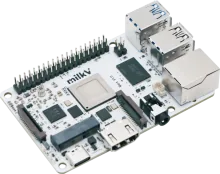
REG Linux device image

Milk-V Mars

Milk-V Mars pairs the StarFive JH7110 SoC with the REG Linux stack for a polished retro console. pairs the StarFive JH7110 SoC with the REG Linux stack for a polished retro console.

Milk-V Mars

Quick specs

  • Manufacturer: Milk-V
  • SoC: StarFive JH7110
  • Download: Coming soon

Hardware specifications

Built for Milk-V

REG Linux targets this hardware profile so you can flash and play without manual tweaking.

Manufacturer

Milk-V

SoC

StarFive JH7110

Download link

Coming soon

Install notes

Flash Milk-V Mars and boot

Follow the workflow below; the official board page contains any extra quirks for the StarFive JH7110 platform.

  1. Grab the image. Download the latest Milk-V Mars build from the downloads page or the official board entry.
  2. Flash to storage. Use balenaEtcher, Raspberry Pi Imager, or `dd` to write the image to an SD card or SSD. Make sure to verify the checksum before booting.
  3. First boot setup. Insert the media into your Milk-V Mars, power on, and let REG Linux expand the filesystem. Pair controllers inside REG-Station once prompted.
  4. Troubleshoot with rescue tools. REG Linux ships with an immutable base and rescue partition—if something breaks, reboot into rescue or reflash without touching your ROMs.

Need a refresher?

Cross-check kernel notes, device trees, or wiring tips on the Milk-V Mars board page.

Back to downloads